TorturedCats (talk | contribs) (Apply approved Sinfar resource-page layout: native headings, compact tables and responsive navigation; preserve existing content.) |
|||
| (5 intermediate revisions by 2 users not shown) | |||
| Line 1: | Line 1: | ||
= Players Custom Scripts = | <div class="sf-page sf-article-page sf-guidance-family sf-resource-page"> | ||
<div class="sf-family-path">[[Main Page|Main Page]] · [[:Category:Builders Tools|Builder resources]]</div> | |||
<div class="sf-hero"><div class="sf-eyebrow">Builder resources · Supporter scripting</div> | |||
<div class="sf-title">Custom Scripting</div> | |||
<p>Player-house script restrictions, spawning, and event integration.</p> | |||
</div> | |||
== On this page == | |||
<div class="sf-task-index">[[#Players_Custom_Scripts|Players Custom Scripts]] [[#Using_Sinfar_Spawning_System|Using Sinfar Spawning System]] [[#Using_the_Module_Events|Using the Module Events]] [[#Using_the_Variable_Based_Events|Using the Variable Based Events]]</div> | |||
== Players Custom Scripts == | |||
Sinfar Supporters can make their own scripts for inside their house. | Sinfar Supporters can make their own scripts for inside their house. | ||
| Line 5: | Line 15: | ||
Here's what each column are for: | Here's what each column are for: | ||
{| class=" | {| class="sf-reference-table sf-table" | ||
|- class="sf-table-head" | |||
! Column !! Description | ! Column !! Description | ||
|- | |- | ||
| Line 35: | Line 46: | ||
* Only Sinfar Supporters can create Players Blueprints/Scripts and upload a house that uses them. Any Sinfar Supporter can use any of the Players Scripts or Bluprints, but they can only be changed by the owner (the player id of the owner is in the ResRef: p_<hex_player_id>_). All resources are listed here: https://nwn.sinfar.net/res_list.php?erf_id=2 | * Only Sinfar Supporters can create Players Blueprints/Scripts and upload a house that uses them. Any Sinfar Supporter can use any of the Players Scripts or Bluprints, but they can only be changed by the owner (the player id of the owner is in the ResRef: p_<hex_player_id>_). All resources are listed here: https://nwn.sinfar.net/res_list.php?erf_id=2 | ||
== Using Sinfar Spawning System == | |||
Sinfar's spawning system is documented here: [[Sinfar Spawning System]] and it can be used inside houses with a few differences. | |||
=== Usage Difference === | |||
# The tag must have the additional prefix "_P_", for example: _P_SPAWN_C_P_25_SERVANT: <br /><div class="sf-guide-image">[[File:Sinfar spawning system 20190313-001318.png]]</div> | |||
# The variables must have the additional prefix "P_", for example P_SPAWN_CHANCE: <br /><div class="sf-guide-image">[[File:Sinfar spawning system 20190313-001245.png]]</div> | |||
=== How It Was Enabled === | |||
Simply by adding those 2 lines: | |||
<syntaxhighlight lang="c"> | |||
RegisterVariableEvent(oArea, "EVENT_WOKEUP", "p_x_wokeupare"); | |||
RegisterVariableEvent(oArea, "EVENT_SUSPEND", "p_x_suspendare"); | |||
</syntaxhighlight> | |||
When an house area is created (SetupHomeArea in [https://nwn.sinfar.net/res_nss_edit.php?name=home_include home_include]). You could do the same by setting variables on your areas ([[Variable Based Events]]) and create your own system, but for Sinfar Spawn System, it is done automatically. | |||
You can look at those 2 scripts: [https://nwn.sinfar.net/res_nss_edit.php?name=p_x_wokeupare p_x_wokeupare] and [https://nwn.sinfar.net/res_nss_edit.php?name=p_x_suspendare p_x_suspendare]: they basically call the same functions but of course in the context of an house script (p_) so GetLocalString automatically ensure that the variable name is prefixed by P_ and the tag check expect the _P_ prefix because it is also mandatory for a player blueprint. | |||
== Using the Module Events == | |||
=== How to Register a Module Event === | |||
Similar to the module events, you can register "Global" events with variables on the area containing the <code>MAIN_DOOR</code>. | |||
<div class="sf-guide-image">[[File:Ph mod events.png]]</div> | |||
=== Events List === | |||
{| class="sf-reference-table sf-matrix" | |||
|- class="sf-table-head" | |||
! scope="col" | Variable Name | |||
! scope="col" | Called From | |||
! scope="col" | Sample Script | |||
|- | |||
! scope="row" | P_MODEVENT_ACQITEM | |||
| <span class="sf-data-label">Called From</span><span class="sf-data-value">[https://nwn.sinfar.net/res_nss_edit.php?name=pf_ev_acqitem pf_ev_acqitem]</span> | |||
| <span class="sf-data-label">Sample Script</span><span class="sf-data-value">[https://nwn.sinfar.net/res_nss_edit.php?name=p_25_acqitem p_25_acqitem]</span> | |||
|- | |||
! scope="row" | P_MODEVENT_UNACQITEM | |||
| <span class="sf-data-label">Called From</span><span class="sf-data-value">[https://nwn.sinfar.net/res_nss_edit.php?name=pf_ev_unacqitem pf_ev_unacqitem]</span> | |||
| <span class="sf-data-label">Sample Script</span><span class="sf-data-value">[https://nwn.sinfar.net/res_nss_edit.php?name=p_25_unacqitem p_25_unacqitem]</span> | |||
|- | |||
! scope="row" | P_MODEVENT_ACTIVATEITEM | |||
| <span class="sf-data-label">Called From</span><span class="sf-data-value">[https://nwn.sinfar.net/res_nss_edit.php?name=pf_ev_activitem pf_ev_activitem]</span> | |||
| <span class="sf-data-label">Sample Script</span><span class="sf-data-value">[https://nwn.sinfar.net/res_nss_edit.php?name=p_25_activatitem p_25_activatitem]</span> | |||
|- | |||
! scope="row" | P_MODEVENT_CHAT | |||
| <span class="sf-data-label">Called From</span><span class="sf-data-value">[https://nwn.sinfar.net/res_nss_edit.php?name=pf_ev_chat pf_ev_chat]</span> | |||
| <span class="sf-data-label">Sample Script</span><span class="sf-data-value">[https://nwn.sinfar.net/res_nss_edit.php?name=p_25_chat p_25_chat]</span> | |||
|- | |||
! scope="row" | P_MODEVENT_PCDEATH | |||
| <span class="sf-data-label">Called From</span><span class="sf-data-value">[https://nwn.sinfar.net/res_nss_edit.php?name=pf_ev_pcdeath pf_ev_pcdeath]</span> | |||
| <span class="sf-data-label">Sample Script</span><span class="sf-data-value">[[https://nwn.sinfar.net/res_nss_edit.php?name=p_25_pcdeath p_25_pcdeath]</span> | |||
|- | |||
! scope="row" | P_MODEVENT_PCDYING | |||
| <span class="sf-data-label">Called From</span><span class="sf-data-value">[https://nwn.sinfar.net/res_nss_edit.php?name=pf_ev_pcdying pf_ev_pcdying]</span> | |||
| <span class="sf-data-label">Sample Script</span><span class="sf-data-value">[https://nwn.sinfar.net/res_nss_edit.php?name=p_25_pcdying p_25_pcdying]</span> | |||
|- | |||
! scope="row" | P_MODEVENT_PCENTER | |||
| <span class="sf-data-label">Called From</span><span class="sf-data-value">[https://nwn.sinfar.net/res_nss_edit.php?name=pf_ev_enterhouse pf_ev_enterhouse]]</span> | |||
| <span class="sf-data-label">Sample Script</span><span class="sf-data-value">[https://nwn.sinfar.net/res_nss_edit.php?name=p_25_pcenter p_25_pcenter]</span> | |||
|- | |||
! scope="row" | P_MODEVENT_PCLEAVE | |||
| <span class="sf-data-label">Called From</span><span class="sf-data-value">[https://nwn.sinfar.net/res_nss_edit.php?name=pf_ev_leavehouse pf_ev_leavehouse]]</span> | |||
| <span class="sf-data-label">Sample Script</span><span class="sf-data-value">[https://nwn.sinfar.net/res_nss_edit.php?name=p_25_pcenter p_25_pcenter]</span> | |||
|- | |||
! scope="row" | P_MODEVENT_RESPAWN | |||
| <span class="sf-data-label">Called From</span><span class="sf-data-value">[https://nwn.sinfar.net/res_nss_edit.php?name=pf_ev_pcrespawn pf_ev_pcrespawn]</span> | |||
| <span class="sf-data-label">Sample Script</span><span class="sf-data-value">[https://nwn.sinfar.net/res_nss_edit.php?name=p_25_respawn p_25_respawn]</span> | |||
|- | |||
! scope="row" | P_MODEVENT_REST | |||
| <span class="sf-data-label">Called From</span><span class="sf-data-value">[https://nwn.sinfar.net/res_nss_edit.php?name=pf_ev_rest pf_ev_rest]]</span> | |||
| <span class="sf-data-label">Sample Script</span><span class="sf-data-value">[https://nwn.sinfar.net/res_nss_edit.php?name=p_25_rest p_25_rest]</span> | |||
|- | |||
! scope="row" | P_MODEVENT_EQUIP | |||
| <span class="sf-data-label">Called From</span><span class="sf-data-value">[https://nwn.sinfar.net/res_nss_edit.php?name=pf_ev_equip pf_ev_equip]</span> | |||
| <span class="sf-data-label">Sample Script</span><span class="sf-data-value">[https://nwn.sinfar.net/res_nss_edit.php?name=p_25_equip p_25_equip]</span> | |||
|- | |||
! scope="row" | P_MODEVENT_UNEQUIP | |||
| <span class="sf-data-label">Called From</span><span class="sf-data-value">[https://nwn.sinfar.net/res_nss_edit.php?name=pf_ev_unequip pf_ev_unequip]</span> | |||
| <span class="sf-data-label">Sample Script</span><span class="sf-data-value">[https://nwn.sinfar.net/res_nss_edit.php?name=p_25_unequip p_25_unequip]</span> | |||
|} | |||
== Using the Variable Based Events == | |||
You can use [[Variable Based Events]] but under a few conditons. | |||
=== How to Register a Variable Event === | |||
In addition to variables with the "P_" prefix, you are allowed (on the Blueprints only) to the EVENT_ prefix, as long as the value starts by "p_". | |||
You can also call the UnregisterVariableEvent/RegisterVariableEvent functions, as long as the script parameter starts by "p_". | |||
You can only bypass (using BypassVariableEvent) your own varible events (that starts by "P_" : [https://nwn.sinfar.net/res_nss_edit.php?name=pf_bypassvarevnt pf_bypassvarevnt]). | |||
=== How to Trigger a Variable Event === | |||
The name of variable events from players scripts must start by P_, for example "P_EVENT_WANTS_HELP". | |||
<div class="sf-footerlinks">[[Main Page|Return to Main Page]] · [[Player Guidance Directory]] · [[:Category:Builders Tools|Builder resources]]</div> | |||
</div> | |||
[[Category:Sinfar Supporters]] | [[Category:Sinfar Supporters]] | ||
Latest revision as of 22:51, 10 November 2026
Player-house script restrictions, spawning, and event integration.
On this page
Players Custom Scripts
Sinfar Supporters can make their own scripts for inside their house.
- The NWScript virtual machine use this 2da: pf_nwscript.2da (Supporter Login Required) ... to validate each function call.
Here's what each column are for:
| Column | Description |
|---|---|
| Enable |
**** = The function call will do nothing and return an empty value. |
| ExecuteScript | After the validation, instead of calling the internal code, this script will be executed as an event with the same parameters. |
| GetNextFunction | Since the default behaviour of GetFirst/Next functions may return invalid objects and so break make it inefficient/impossible to loop through all objects, when this field is set, the engine will automatically call this next function until it can return a valid object or if it has really reached the last object. |
| ObjectSelf Param1 Param2 ParamN |
This are the restriction of each parameter and the caller. If the restriction check fails, the function call will do nothing and return an empty value. The parameter depends on the value type NO_PC = The object must have been created by a player script. NO_MODULE = The object can't be the module. string/any value (often "P_") = What the string must start by. |
- Only the module and objects that are in the house (any area of the house) are accessible. Functions may return external objects but then GetIsObjectValid(oExternalObject) will return false and calling any function with those objects as parameter will fail.
- Only Players Blueprints can be created with the CreateObject function.
- The events script field of Player Blueprints must start by "p_".
- Players Dialogs must start by "p_".
- Players Blueprints Tag must always start by "_P_".
- Local variables and Campaign variables must start by "P_".
- Only Sinfar Supporters can create Players Blueprints/Scripts and upload a house that uses them. Any Sinfar Supporter can use any of the Players Scripts or Bluprints, but they can only be changed by the owner (the player id of the owner is in the ResRef: p_<hex_player_id>_). All resources are listed here: https://nwn.sinfar.net/res_list.php?erf_id=2
Using Sinfar Spawning System
Sinfar's spawning system is documented here: Sinfar Spawning System and it can be used inside houses with a few differences.
Usage Difference
- The tag must have the additional prefix "_P_", for example: _P_SPAWN_C_P_25_SERVANT:

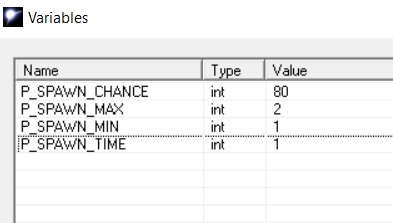
- The variables must have the additional prefix "P_", for example P_SPAWN_CHANCE:


How It Was Enabled
Simply by adding those 2 lines:
    RegisterVariableEvent(oArea, "EVENT_WOKEUP", "p_x_wokeupare");
    RegisterVariableEvent(oArea, "EVENT_SUSPEND", "p_x_suspendare");
When an house area is created (SetupHomeArea in home_include). You could do the same by setting variables on your areas (Variable Based Events) and create your own system, but for Sinfar Spawn System, it is done automatically.
You can look at those 2 scripts: p_x_wokeupare and p_x_suspendare: they basically call the same functions but of course in the context of an house script (p_) so GetLocalString automatically ensure that the variable name is prefixed by P_ and the tag check expect the _P_ prefix because it is also mandatory for a player blueprint.
Using the Module Events
How to Register a Module Event
Similar to the module events, you can register "Global" events with variables on the area containing the MAIN_DOOR.

Events List
| Variable Name | Called From | Sample Script |
|---|---|---|
| P_MODEVENT_ACQITEM | Called Frompf_ev_acqitem | Sample Scriptp_25_acqitem |
| P_MODEVENT_UNACQITEM | Called Frompf_ev_unacqitem | Sample Scriptp_25_unacqitem |
| P_MODEVENT_ACTIVATEITEM | Called Frompf_ev_activitem | Sample Scriptp_25_activatitem |
| P_MODEVENT_CHAT | Called Frompf_ev_chat | Sample Scriptp_25_chat |
| P_MODEVENT_PCDEATH | Called Frompf_ev_pcdeath | Sample Script[p_25_pcdeath |
| P_MODEVENT_PCDYING | Called Frompf_ev_pcdying | Sample Scriptp_25_pcdying |
| P_MODEVENT_PCENTER | Called Frompf_ev_enterhouse] | Sample Scriptp_25_pcenter |
| P_MODEVENT_PCLEAVE | Called Frompf_ev_leavehouse] | Sample Scriptp_25_pcenter |
| P_MODEVENT_RESPAWN | Called Frompf_ev_pcrespawn | Sample Scriptp_25_respawn |
| P_MODEVENT_REST | Called Frompf_ev_rest] | Sample Scriptp_25_rest |
| P_MODEVENT_EQUIP | Called Frompf_ev_equip | Sample Scriptp_25_equip |
| P_MODEVENT_UNEQUIP | Called Frompf_ev_unequip | Sample Scriptp_25_unequip |
Using the Variable Based Events
You can use Variable Based Events but under a few conditons.
How to Register a Variable Event
In addition to variables with the "P_" prefix, you are allowed (on the Blueprints only) to the EVENT_ prefix, as long as the value starts by "p_".
You can also call the UnregisterVariableEvent/RegisterVariableEvent functions, as long as the script parameter starts by "p_".
You can only bypass (using BypassVariableEvent) your own varible events (that starts by "P_" : pf_bypassvarevnt).
How to Trigger a Variable Event
The name of variable events from players scripts must start by P_, for example "P_EVENT_WANTS_HELP".